A coding agent follows UI feedback when the feedback is specific in three ways: it points at the exact element, it asks for one change, and it says what the result should be. Then have the agent reply with what it changed, and compare the new version with the old one yourself. Vague feedback gets you a guess.
This works with Claude Code, Codex, Cursor or any other coding agent. The examples use AgentDesign, a Mac app where your agent draws each screen before it builds it. The last section covers what to do without it.
Why "make it cleaner" fails
"Make it cleaner" has no element, no change and no finish line. The agent has to pick all three. It may change five things at once, including two you liked.
Two complaints come up again and again when people build screens with an agent:
- "Move the button up. No, the other one." You write several prompts to change one thing.
- "It changed things I never asked for." In a long code diff, a changed screen can get lost.
Both come from the same gap. You know which part you mean and what you want. The agent only has your words.
1. Point at the element
Words are poor at saying where something is. "The button at the bottom" could be two buttons. There are three ways to point, from weakest to strongest:
- Name it by its text. "The Continue button" beats "the main button".
- Mark up a screenshot. Draw a box and attach it to your message.
- Pin the comment on the element. The agent gets the element itself, not your description of it.
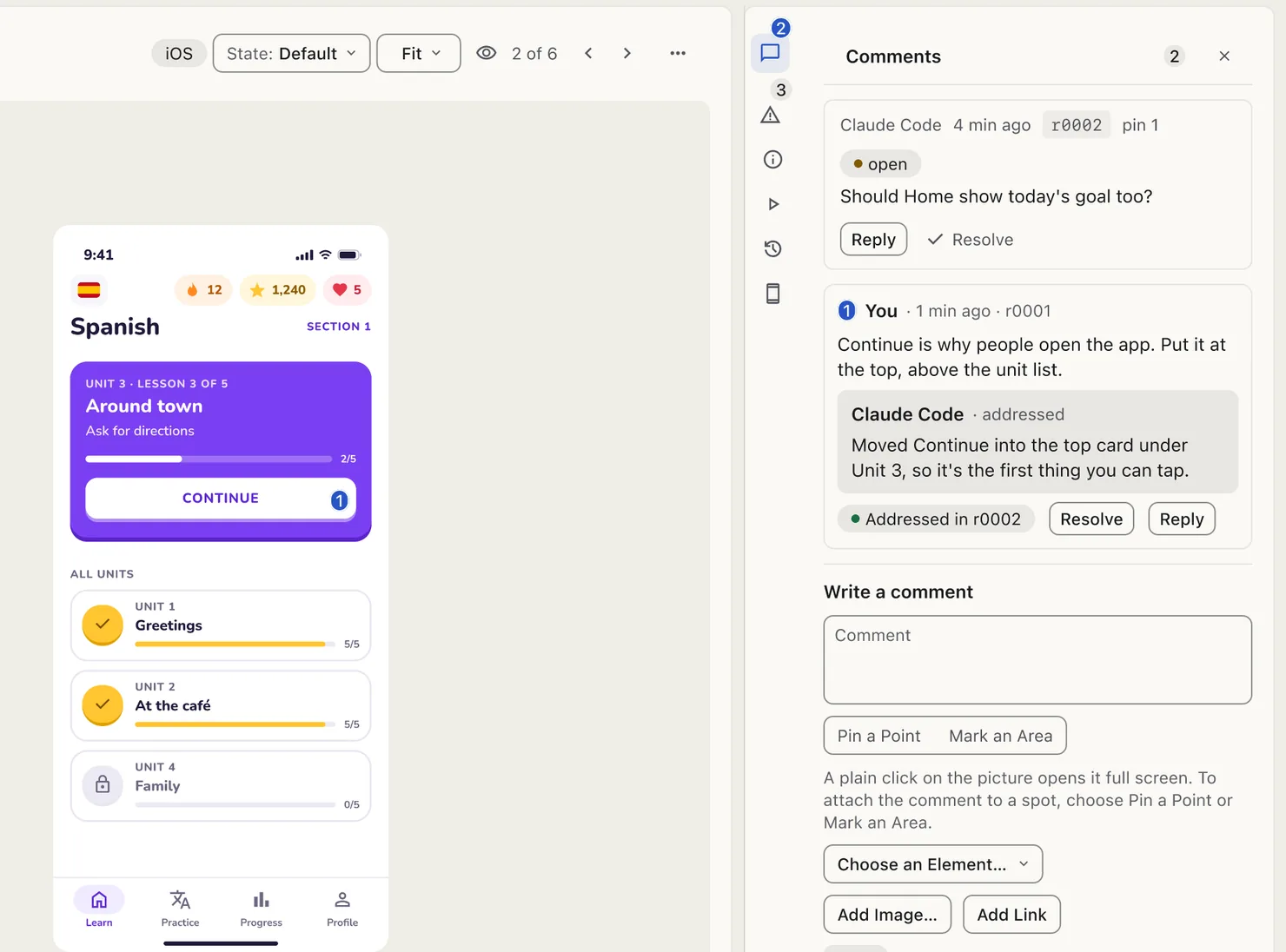
In AgentDesign you choose Pin a Point and click the part, or Mark an Area and drag a box around it. Your agent gets the exact elements you marked. You can attach an image or a link to the comment too.
2. Ask for one change per comment
Put three requests in one message and you get three changes in one revision. If one of them is wrong, you can't send back just that one.
One comment, one change. Each can then be answered, checked and closed by itself. If you have five things to say about a screen, write five short comments.
3. Say the result, and the reason when it helps
"Move it up" leaves the agent to decide how far. "Put it at the top, above the unit list" does not.
A reason helps when the change has details you didn't spell out. The comment on Sprout's Home screen reads:
Continue is why people open the app. Put it at the top, above the unit list.
The first sentence tells the agent what matters. It can then get the small decisions right, such as how prominent the button should be, without another round.
Keep the reason to one sentence.
4. Have the agent reply with what it changed
Don't accept a silent revision. Ask for one sentence that says what was done.
In AgentDesign the reply lands in the same thread, and the comment is marked as addressed with the revision that answers it. Claude Code's reply to the comment above:
Moved Continue into the top card under Unit 3, so it's the first thing you can tap.
Now you know what to look for. If the reply describes something you didn't ask for, you've caught it before any code was written.
5. Compare the revision with the last one
The reply is a claim. Check it.
Open the screen's Revisions and use Compare beside the earlier revision. Both designs sit side by side, with the change outlined. Look at the outlined part first. Then look at the rest and ask one question: did anything else move?
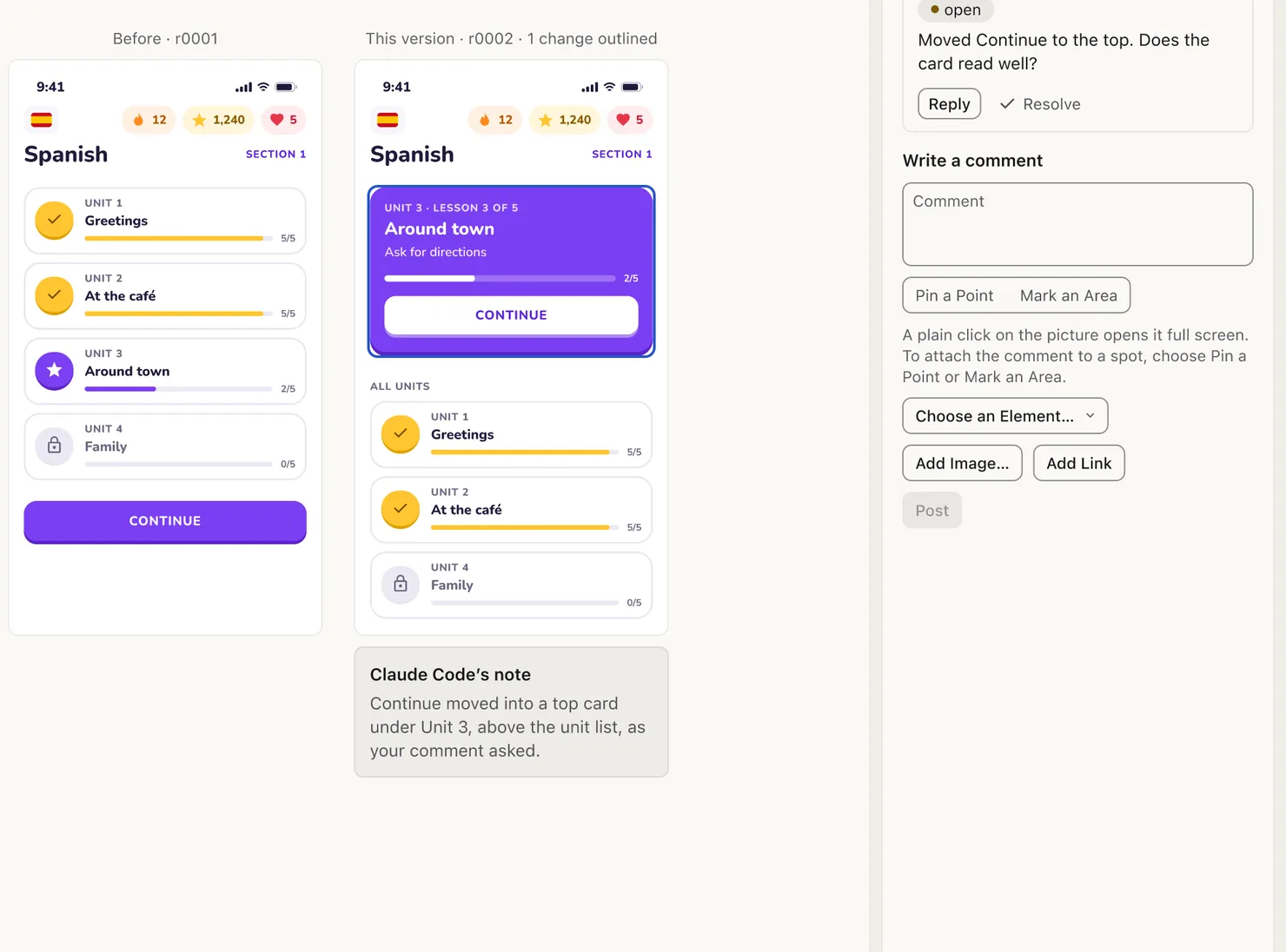
This is the step that catches "it changed things I never asked for". A code diff won't show you a screen. Two pictures will.
6. Close it yourself
A comment is done when you say so, not when the agent does.
In AgentDesign only you can resolve a comment, and Resolve can be undone. A design is Needs review, Approved or Changes requested, and only you can approve. One page lists every open comment and who moves next, so nothing sits forgotten in a chat log.
If the change isn't right, reply in the same thread with what's still off. Don't start a new one. The history of that element stays in one place.
Comments you can copy
Swap in your own element names.
- Move. "Move the total above the Pay button."
- Remove. "Remove this banner. Nothing replaces it."
- Reword. "Change this label to 'Start lesson'."
- Rank. "Make Continue the most prominent thing on this screen. Keep everything else as it is."
- Fence. "Change only this card. Leave the rest of the screen alone."
- Ask. "Why is this row here? Don't change anything yet."
The last one is useful more often than you'd think. An agent that adds a part usually had a reason, and the reason tells you whether to keep it.
How your agent hears about a comment
A comment helps only if the agent reads it. In AgentDesign:
- An open Codex session is told on its own.
- Claude Code can be told too, when you start it with the command shown in Settings > Agents.
- Other agents hear at their next session.
You can always just ask: "Read the open comments on Home and revise the screen."
Without a design tool
The same six rules work in plain chat.
- Attach a screenshot with a box drawn on the part you mean, or name the element by its visible text.
- One change per message.
- Say the result: where it goes, what it says, what it replaces.
- End with "Tell me in one sentence what you changed."
- Take a screenshot before and after, and put them side by side.
- Keep your own list of what's still open.
It costs more effort, because every check happens after a build. That's the difference a design step makes: when the agent draws the screen first, a change costs a comment instead of a rebuild.
Try it on one screen
AgentDesign's free demo has every feature for one project and two versions. There's no account and no time limit, and it runs on Apple silicon Macs with macOS 13 or later. Review your first screen takes you through one pinned comment from start to finish. Features lists everything comments and reviews can do.