Keep Figma if people on your team draw the designs. Figma is a design editor, and coding agents can now read and write its files through Figma's MCP server. Choose AgentDesign if nobody draws: your coding agent draws each screen, you point at what to change and approve it, and every version is kept as plain files on your Mac.
Everything said about Figma below comes from Figma's own pages as of November 2026. The links are at the end.
At a glance
| Figma | AgentDesign | |
|---|---|---|
| Who draws | People, in an editor. Agents can also write to the canvas through the MCP server, in beta. | Your agent. You don't draw. |
| How an agent connects | Remote MCP server. You sign in with your Figma account. | An MCP server inside the app, running on your Mac. No account. |
| Comments | Pinned to a location or region. Attached to the top-level frame, component or group. | Pinned to a point or an area. The agent gets the exact elements, replies in the thread, and only you resolve. |
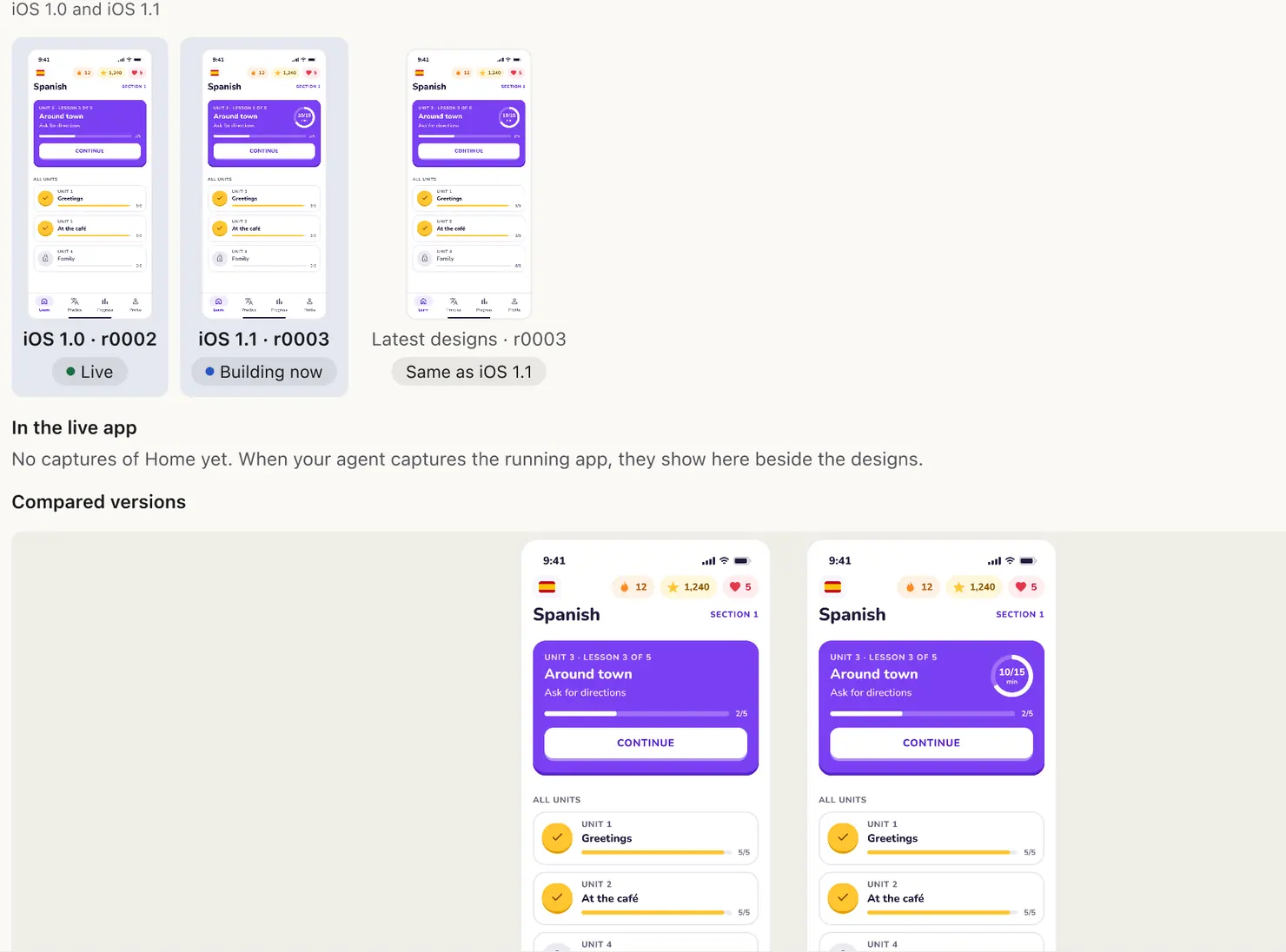
| History | Version history per file, with a checkpoint every 30 minutes and versions you can name. | Every revision of every screen is kept. Versions are releases: planned, building now, live or retired. |
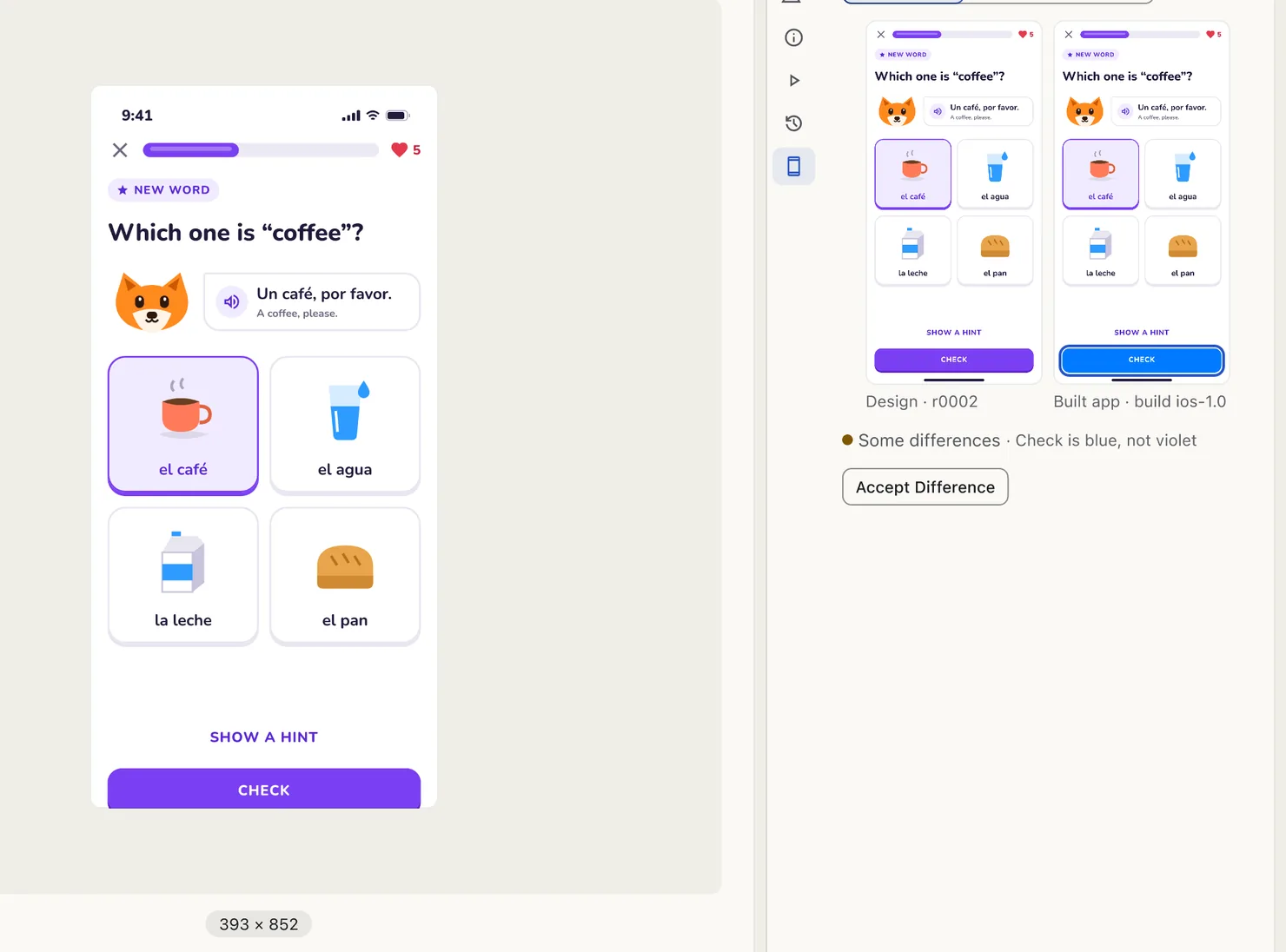
| Checking the build | Code to canvas captures live UI from your browser as editable layers. | A screenshot from a simulator, an emulator or a local web build sits beside the design, with the differences marked. |
| Where designs are | In your Figma account. | JSON, Markdown and PNG files in a folder you choose. |
| Price | Starter is free. Paid plans start from $16 per Full seat per month. | Free demo. $29 once. |
Who draws
Figma is built for designing by hand, and for teams working in the same file.
Agents can now work in it too. Figma describes its MCP server like this: it "gives AI agents the design context they need to generate code from your Figma files, and lets agents write native Figma content back to the canvas." The writing happens through a tool called use_figma, which lets the agent "create and update real design structure rather than a screenshot or static export."
A few conditions apply, in Figma's words and as of November 2026:
- Writing to the canvas is in beta. It is free during the beta and "will eventually become a usage-based paid feature."
- It is offered on Professional, Education, Organization and Enterprise plans, and it needs the remote server.
- You need a Full seat to write to files outside your drafts. With a Dev seat, the agent can write in your drafts only.
- "Output is beta quality and may need manual review and cleanup."
In AgentDesign, only the agent draws. You look, comment and approve. There is no pen tool and no way to nudge a button yourself. If you want to adjust designs by hand, AgentDesign is the wrong tool, and its own site says so.
How feedback reaches the agent
In Figma you add a comment "to a pinned location or region on the canvas." Figma attaches it to the top-level frame, component or group, so it moves when the frame moves. Its help page adds: "Comments won't attach to any nested frames, components, groups, or other layers." Comments are written for collaborators. You can @mention people and user groups.
To point an agent at a design, you give it a link. Figma's docs say the remote server "uses links to know which file or layer to work with."
In AgentDesign the reader of a comment is your agent.
- You choose Pin a Point or Mark an Area, and the agent gets the exact elements you marked.
- An open Codex session is told about a new comment on its own. Claude Code can be told too, when you start it with the command shown in Settings > Agents. Other agents hear at their next session.
- The agent changes the design, replies in the thread and marks the comment addressed.
- Only you can resolve it.
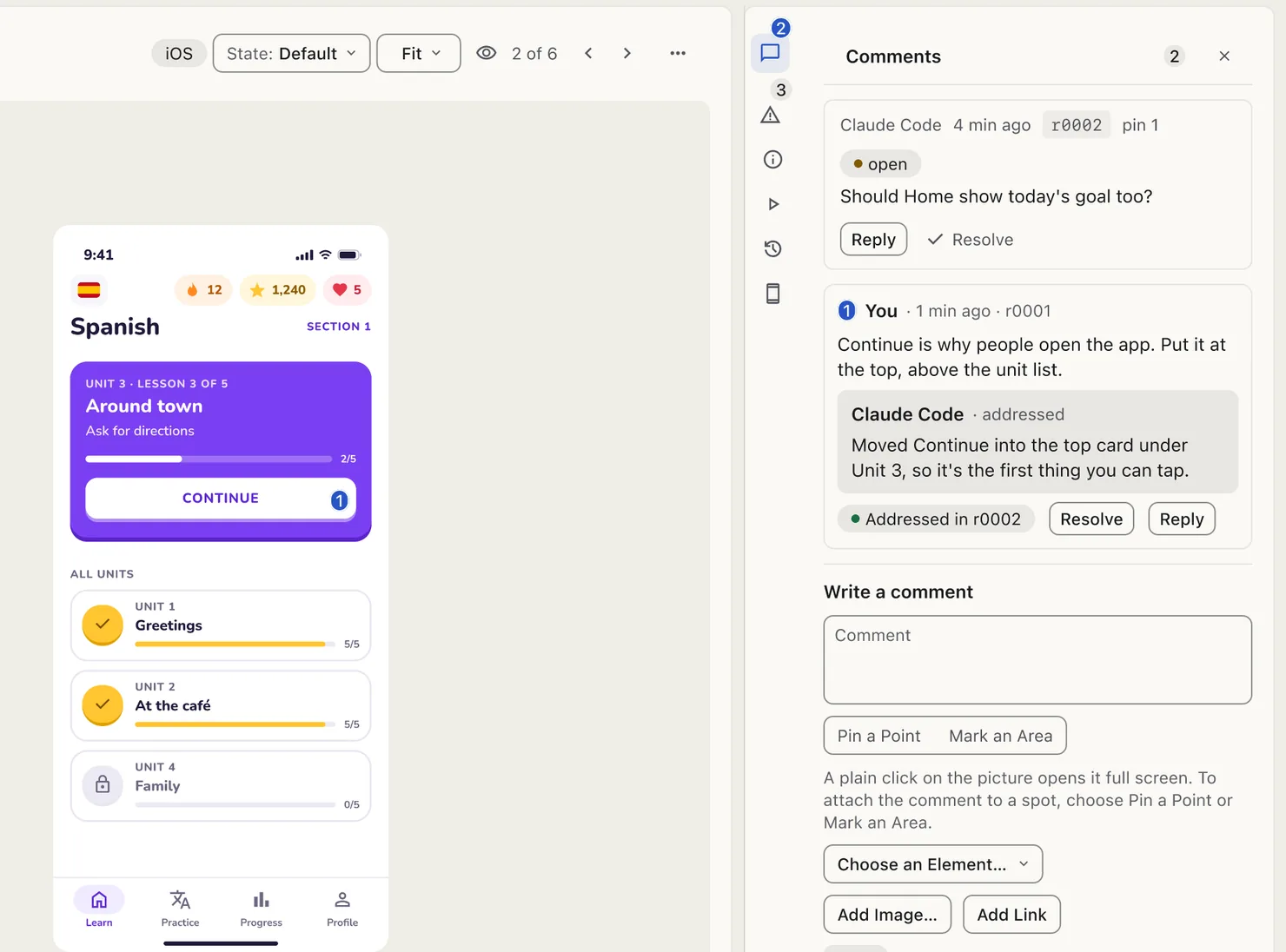
Each design is also Needs review, Approved or Changes requested. Only you can approve, and the agent writes code after that.
Versions, and what is live
Figma keeps a version history for each file. It "records a new checkpoint every 30 minutes," and you can name a version and restore an earlier one. On the Starter plan and in Drafts, you "can only access up to 30 days of version history." Paid plans see the full history. Figma's pricing page also lists this for Dev Mode: "Compare different versions of a frame to quickly see what’s changed."
AgentDesign keeps history at two levels.
- Revisions. Every change to a screen is a numbered revision with a reason. Put any two side by side.
- Versions. A version is a release of your app, such as iOS 1.0. It is planned, building now, live or retired. A live version keeps its screens as they were.
So you can ask questions about releases: what does iOS 1.1 change compared with what's live? How did Home look in each version?
Checking the built app
Both tools can bring the built screen back next to the design. They do it differently.
Figma's code to canvas lets you "capture live UI from your browser and turn it into editable Figma design layers." Your team can then rearrange and annotate those layers on the canvas.
In AgentDesign your agent takes a screenshot of the running app from a simulator, an emulator or a local web build. The app puts it beside the design you approved and adds a third picture that marks the differences. Each screen is then Matches, Looks different or Not captured, and you can accept a difference. Screenshots don't come from a phone or a live website.
Files, account and price
Figma. You sign in with a Figma account, and the remote MCP server connects your agent to Figma directly. The Starter plan is free. Paid plans are priced per seat, from $16 per Full seat per month on the Professional plan, in US dollars. How often an agent can call the MCP server's read tools depends on your plan and seat.
AgentDesign. There is no account. Designs are plain files in a folder on your Mac, and you can put that folder in Git. A connected coding agent may send the designs it reads to its AI provider. The free demo has every feature for one project and two versions, with no time limit. A license is $29, paid once, for one person on up to two Macs, with a year of updates. It runs on Apple silicon Macs with macOS 13 or later. Windows and Linux are planned.
When to keep Figma
- Someone on your team draws, or wants to adjust designs by hand.
- Several people work in the same file. AgentDesign has no cloud sync, and one license covers one person.
- You already have a design system in Figma. Agents writing to the canvas can build with your existing components and variables.
- You rely on plugins.
- You're on Windows or Linux today.
When AgentDesign fits
- You build with Claude Code, Codex or Cursor.
- Your app has screens: iOS, Android or web.
- You have no designer, so your agent guesses.
- You want an approval step before any code is written, and a check after the build.
- You want every version of every screen kept next to your code, with no account.
Using both
You can use both, but they don't share files. AgentDesign can't open a .fig file, never signs in to Figma, and imports no Figma files.
In practice that means a split by job. Keep hand-drawn work in Figma: your logo, brand and marketing pieces. Let your agent draw the app's screens in AgentDesign, where you review them. When a screen should follow something drawn in Figma, attach an image or a link to your comment so the agent has the reference.
Try it
The free demo needs no account. Pricing has what the demo and the license include, Features lists everything in the app, and HTML mockups or AgentDesign covers a third way to review screens.
Sources
Figma's pages, read on 26 November 2026:
- Figma MCP server: introduction
- Set up the remote server
- Write to canvas
- Code to canvas
- Figma MCP server FAQs
- Add comments to files
- View a file's version history
- Plans and pricing
Figma is a trademark of Figma, Inc. AgentDesign is not affiliated with Figma.