AI-built apps look generic because one prompt asks the agent to choose the look, lay out the screen and write the code at once. With nothing to go on, it falls back on the most common patterns. The fix is a design step before the code: settle the look on one screen, approve it, then build the rest against it.
The tells
You know the look when you see it.
- Every screen is a stack of rounded cards with the same padding.
- The font, the colors and the icons are whatever the framework ships with.
- Screens built in different sessions don't match. Two button styles. Three greys.
- There are parts nobody asked for: a stats row, a banner, a second button.
- Nothing is the most important thing on the screen. Everything has the same weight.
None of these is a bug. The app runs. It looks like nobody decided anything, because nobody did.
Why one prompt gives you the average
"Build the home screen" hands your agent three jobs:
- Decide how the app should look.
- Decide what goes where on this screen.
- Write the code.
The prompt only helps with the third. For the first two the agent has to guess, and the safest guess is the pattern it has seen most often.
Two more things make it worse.
Sessions start fresh. Unless the look is written down somewhere the agent reads, each new session guesses again. That's where the mismatched buttons come from.
You see the screen after it's built. By then a change of direction means rework. So you fix the worst of it and accept "fine".
A longer prompt helps a little. But a prompt is words, and a look is hard to put into words. "Clean, modern and friendly" describes most apps.
The five fixes below work with Claude Code, Codex, Cursor or any other coding agent. The examples use AgentDesign, a Mac app where your agent draws each screen before it builds it. You can do a lighter version without it, and that's covered near the end.
Fix 1: Decide the look once, where the agent reads it
Colors, type and spacing are decisions. Make them once, give them names, and put them where every session will find them.
A rules file such as CLAUDE.md or AGENTS.md is a good start. It tells your agent which values to use and what not to touch.
In AgentDesign the same decisions live with the designs:
- Colors, type and spacing are saved once for the project, each with a Day and a Night value.
- Shared components are designed once and used on every screen.
- House rules are rules your agent reads before it works on the project. Only you can change them.
- A starter kit gives you colors, components and first screens to start from.
After that, a new screen isn't a new guess. The agent builds it from parts you've already agreed on.
Fix 2: Approve one screen before you ask for ten
Pick the screen people will see most. Get that one right before anything else exists.
It's much easier to react to a picture than to describe a look from nothing. So let the agent draw a first draft, then push on it: this is too heavy, that should come first, this card can go. When the screen is right, approve it. Every later screen has something to match.
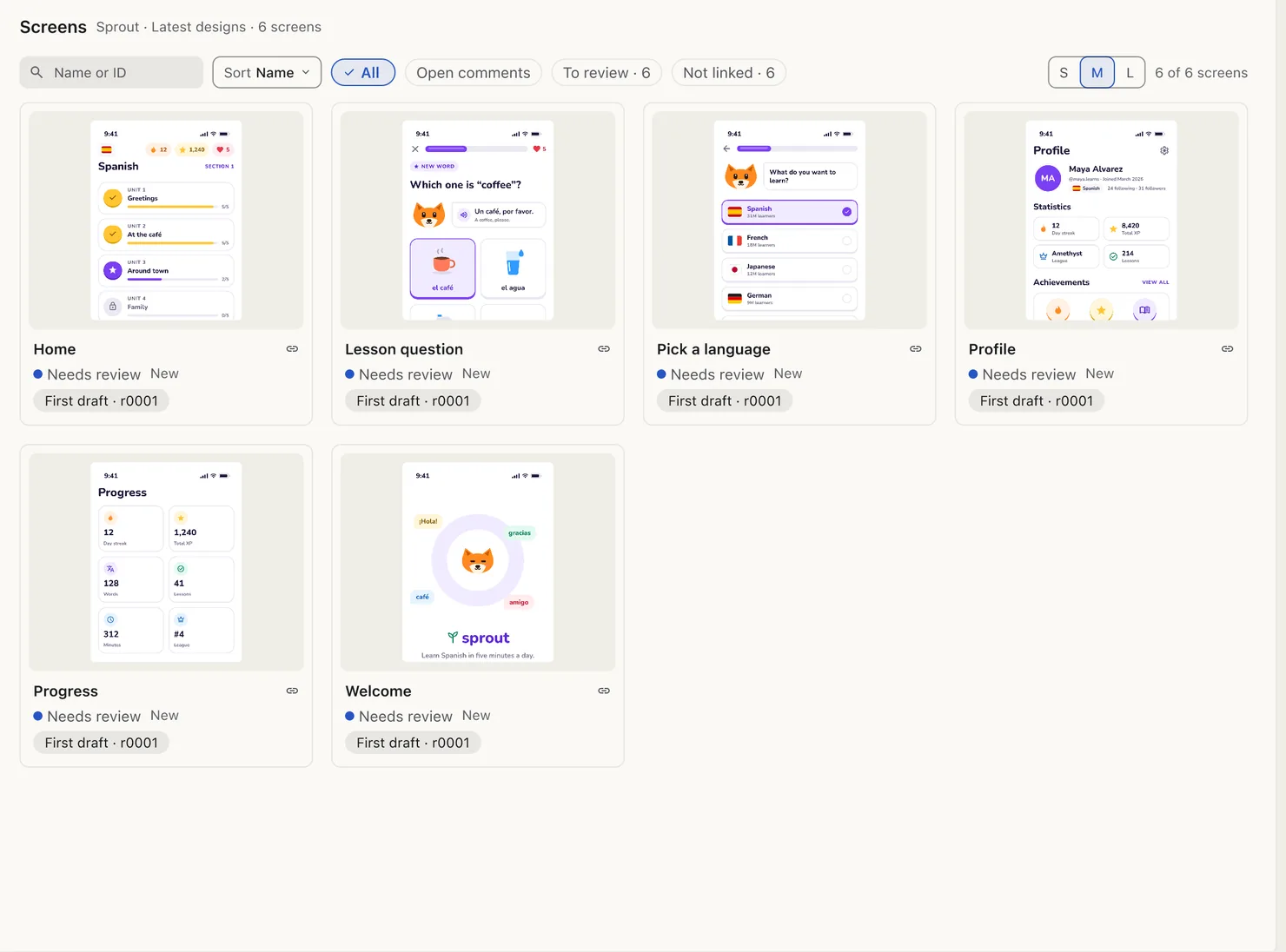
In AgentDesign your agent draws the screen before it writes any code. Each design is Needs review, Approved or Changes requested, and only you can approve.
Fix 3: Ask for options, not one answer
When a screen could work several ways, a single answer hides the choice from you. You get the agent's first idea and never see the others.
Ask for three, side by side:
Before you draw the lesson screen, show me three ways to answer a question, as an option board. Don't pick for me.
In Sprout, the question was "How should answers look in a lesson?" The agent drew three options: a word list, picture cards and typing the word. Picture cards won, and the reason was kept with the choice: "Beginners need the picture. Typing can wait for unit 4."
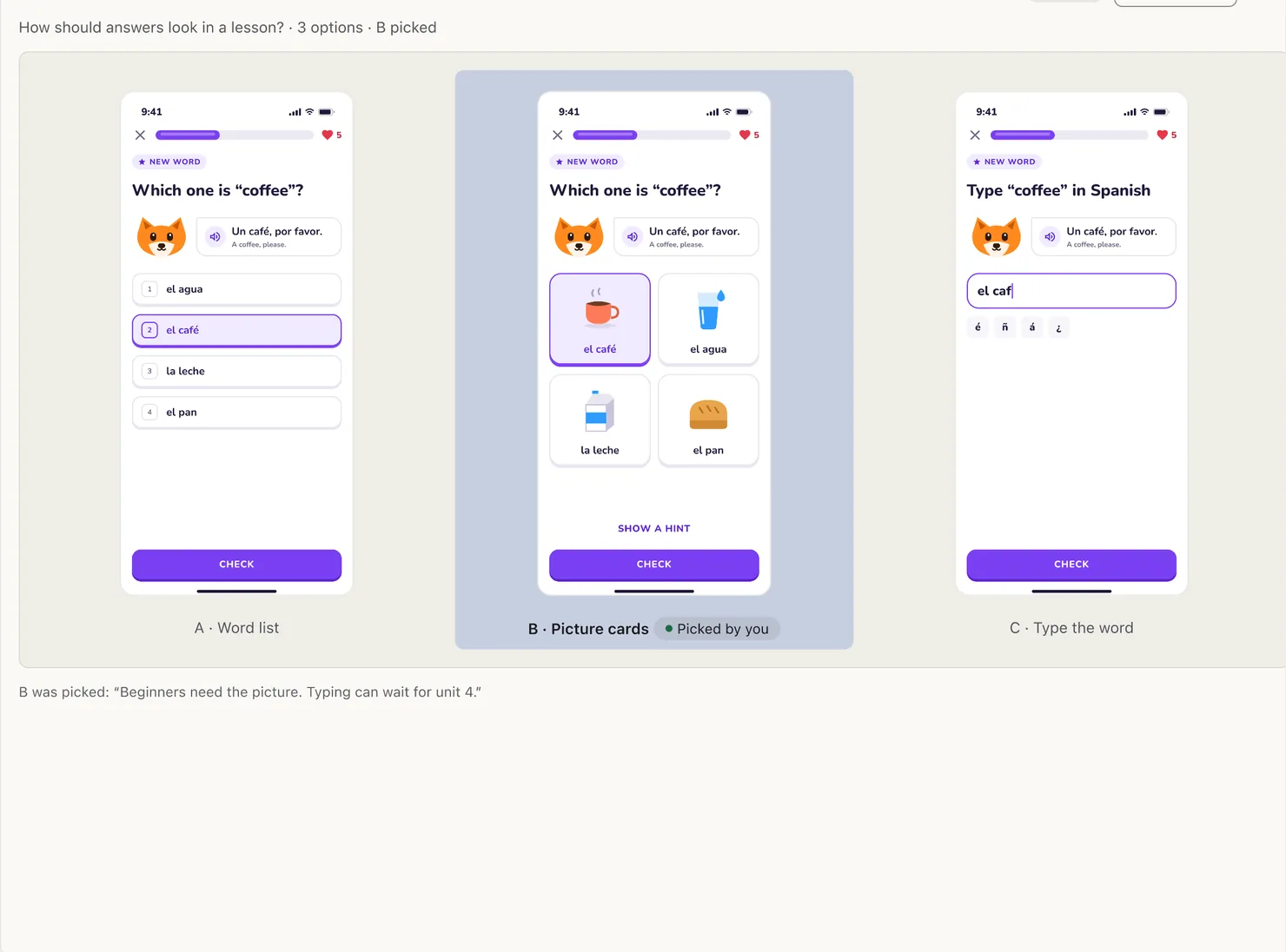
That one choice is the opposite of generic. It's a decision about this app and these users, and no default would have made it for you.
In AgentDesign, your agent records what you settle as a decision, along with the questions still open. The Decisions page lists them.
Fix 4: Review on the screen, not in chat
A generic screen often stays generic because fixing it is tiring. You type "move the button up", the agent moves the wrong one, and you type again.
Point at the part instead. In AgentDesign you pin a comment on the exact element. Your agent changes the design and replies in the same thread, and you resolve the comment when the change is right.
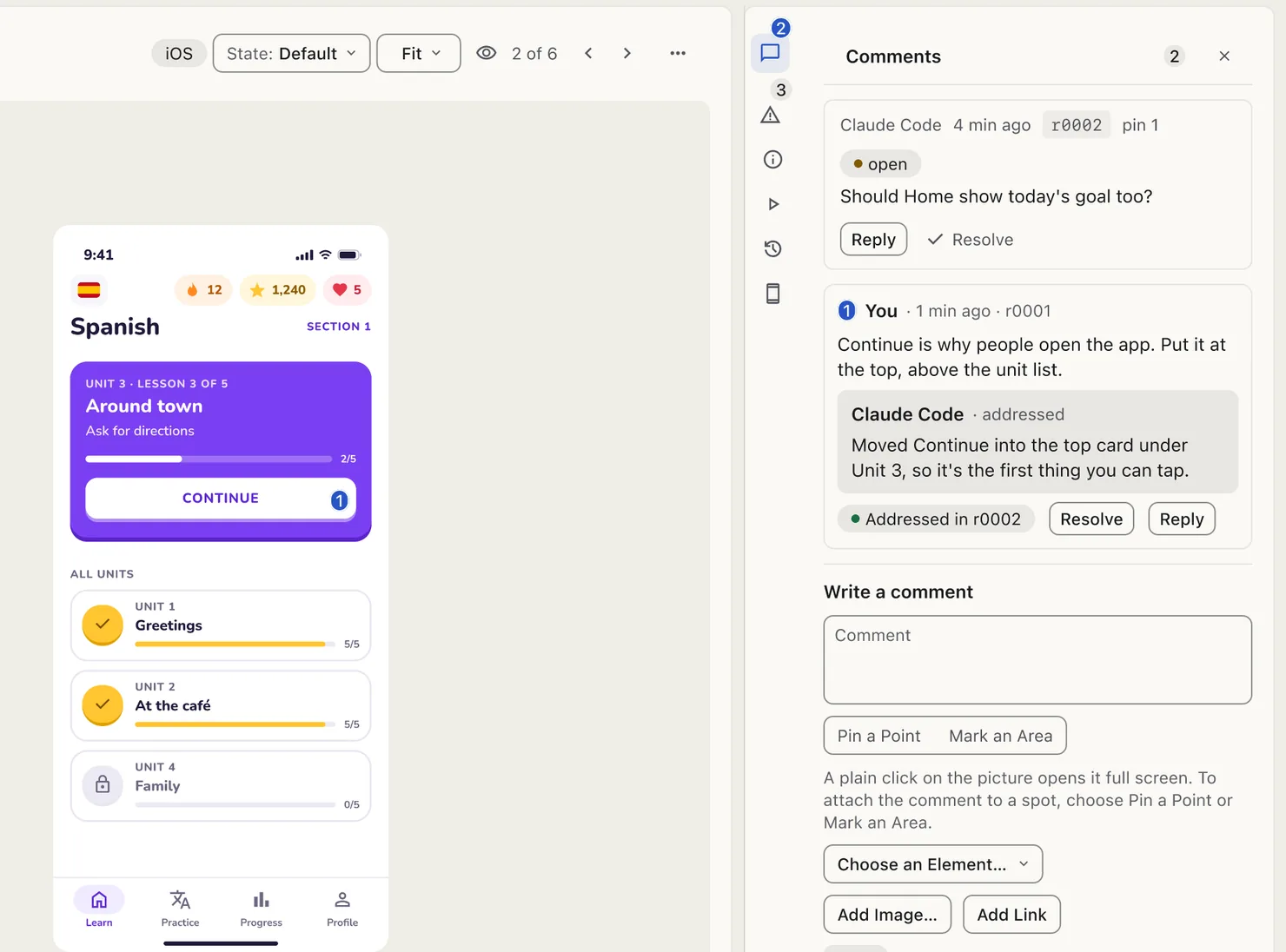
Small corrections are what turn a default layout into your layout. They only happen if each one is cheap to make. How to give UI feedback a coding agent follows covers how to write those comments.
Fix 5: Carry it to every screen
One good screen doesn't make a consistent app. The look has to hold as the app grows.
- Reuse parts. A button designed once as a shared component looks the same everywhere it's used.
- Check the reach of a change. Before a change to a shared part, AgentDesign shows how many screens it touches.
- Keep earlier versions. When your agent changes a screen, the earlier revision stays. Put any two side by side to see whether the screen got better or just different.
- Check the build. After your agent builds a screen, it can screenshot the running app. AgentDesign puts the screenshot beside the design and marks the differences.
The last step matters more than it sounds. A careful design is no use if the built screen quietly falls back to defaults.
Without a design tool
You can get part of the way with what you have.
- Write your colors, font and spacing into your rules file as named values.
- Build one screen first. Screenshot it, and attach that screenshot when you ask for the next screen.
- Ask for options as three small HTML files and open them side by side.
- Keep a short list of decisions in the repo, each with its reason.
The limit is the same each time: you see the result only after something is built, and your feedback goes through words. HTML mockups or AgentDesign compares the two ways of working on one change.
What a design step won't do
It won't give your agent taste. The first draft may still be plain.
What changes is when you see it. A plain draft that exists only as a drawing costs one comment to fix. The same screen, already built, costs a rebuild. So you fix more, earlier, and the app ends up looking like something you decided on.
Try it on your own app
AgentDesign runs on Apple silicon Macs with macOS 13 or later. The free demo has every feature for one project and two versions, with no account and no time limit. A license is $29, paid once. How to design UI with Claude Code before it writes code walks through the setup, and Features lists everything in the app.